All of EMS logistics.
One system —
from the ambulance to HQ.
Paralog replaces scattered Excel workbooks and paper with one source of truth: warehouse, consumption cards, orders, invoices and public-procurement (PZP) settlements, equipment, expiry dates, shifts, rosters and announcements. Medical staff report from the smartphone in the ambulance — even without signal. Station managers and HQ see everything in the browser.
- Built on the real processes of a working ambulance station.
- Every operation leaves a full trail: who, what, when and why.
- No batch scanning at the patient. No retyping from paper.
One database, three places of work
AMBULANCE
Smartphone · PIN · offline
Consumption, shift checklist, failures, announcements — four big actions, no login.
STATION
Warehouse · cards · shifts · roster
The manager fulfils cards, watches stock and expiry, and plans crew rosters.
HQ
Orders · invoices · PZP · statistics
Approvals, auto-split by supplier, KSeF, cost allocation to teams, reports.
- modules in one system
- 12
- modules in one system
- Excel workbooks replaced by one database
- 5→1
- Excel workbooks replaced by one database
- of offline work in the ambulance
- 36h
- of offline work in the ambulance
- of operations with a full audit trail
- 100%
- of operations with a full audit trail
Data is everywhere. The ambulance can't wait.
Running an ambulance station today means scattered spreadsheets, separate tools and paper — and every retyped number is an error nobody notices until the tender or the audit.
Today
- Five workbooks: warehouse, orders, PZP settlements, equipment, expiry — each in a different version with a different person.
- Paper consumption cards and vehicle checklists, retyped into the computer after the shift.
- Invoice, order and delivery never meet — differences surface when settling with HQ.
- Expiry dates tracked from memory — an expired drug in the ambulance is a risk, not an exception.
- Shift rosters in Excel, with no control of rest time, hour norms or driving licences.
- Nobody knows who changed a number in a cell, or when.
With Paralog
- One database for every area — stock, shortages and expiry visible at once for the station and HQ.
- Medical staff report consumption and failures from the smartphone in the ambulance, confirming with a PIN — offline too.
- Order ↔ invoice (KSeF or scan) ↔ delivery protocol — three-way control before anything reaches settlement.
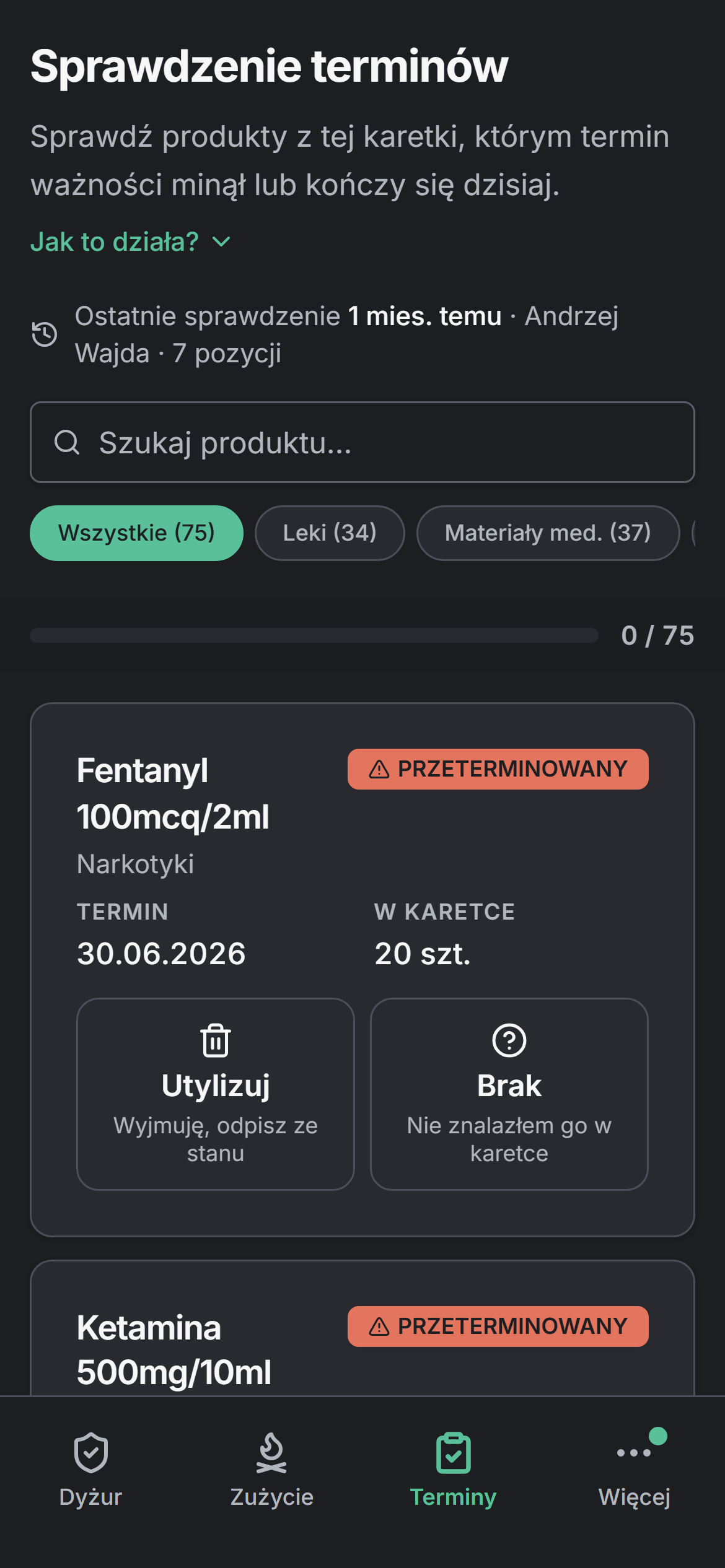
- The system watches expiry in the warehouse and in every ambulance, with a PDF disposal protocol.
- Roster with a crew generator, rest-time and norm control, confirmations and work cards.
- Every operation with a full trail: who, what, when, why — reversible without deleting history.
Ambulance. Station. HQ.
One database, three different places of work. Everyone sees exactly what they need — and data entered once in the ambulance flows without retyping all the way to invoice settlement.
01 · AMBULANCE
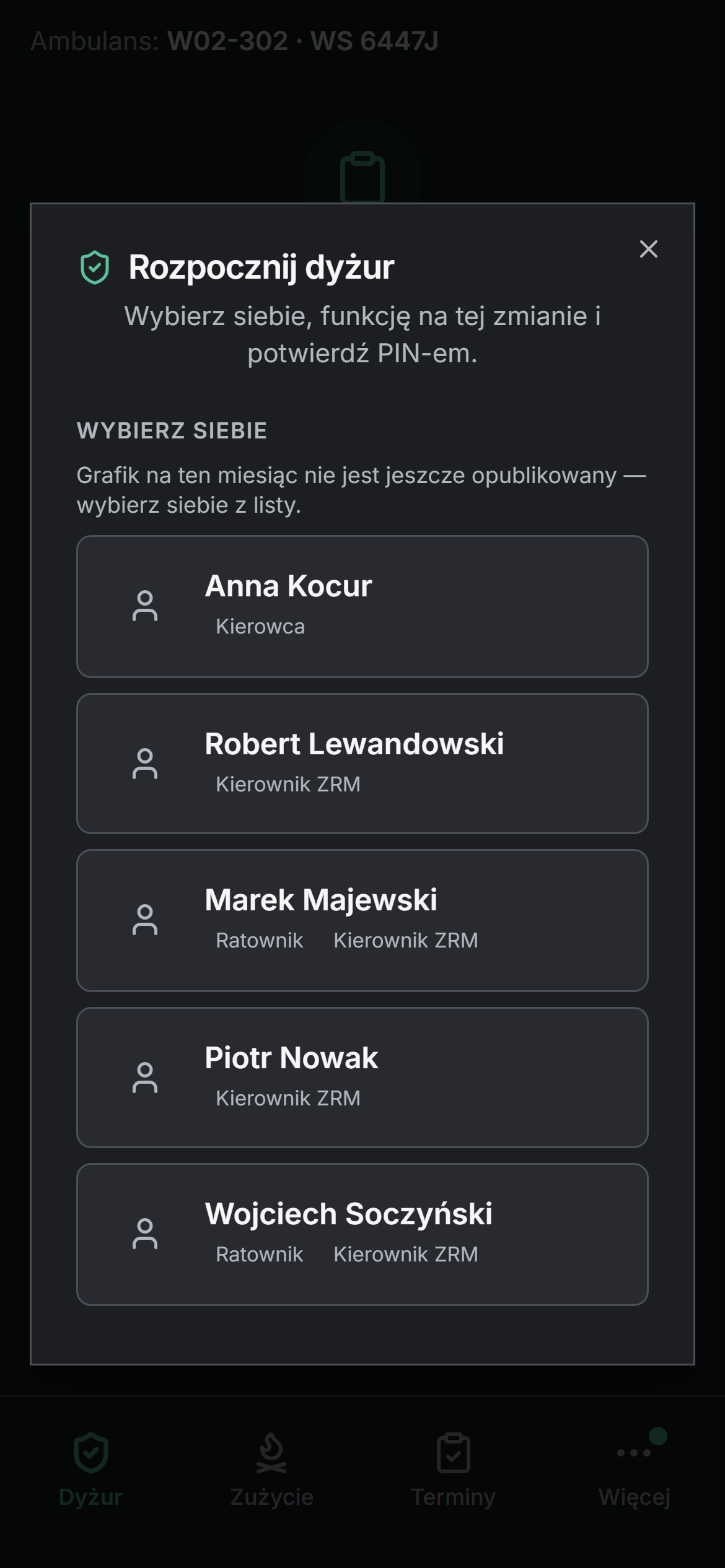
Four big buttons. PIN instead of password. Works without signal.
The smartphone assigned to the vehicle is the ambulance account. Medical staff clock in, run the shift checklist, report consumption at the patient — also by voice — and failures with photos. Every action is confirmed with a four-digit PIN, so it is always known who did what. Without network, reports are stored locally and sync on their own.
02 · STATION
The manager sees the warehouse, team cards, shifts and roster in one place.
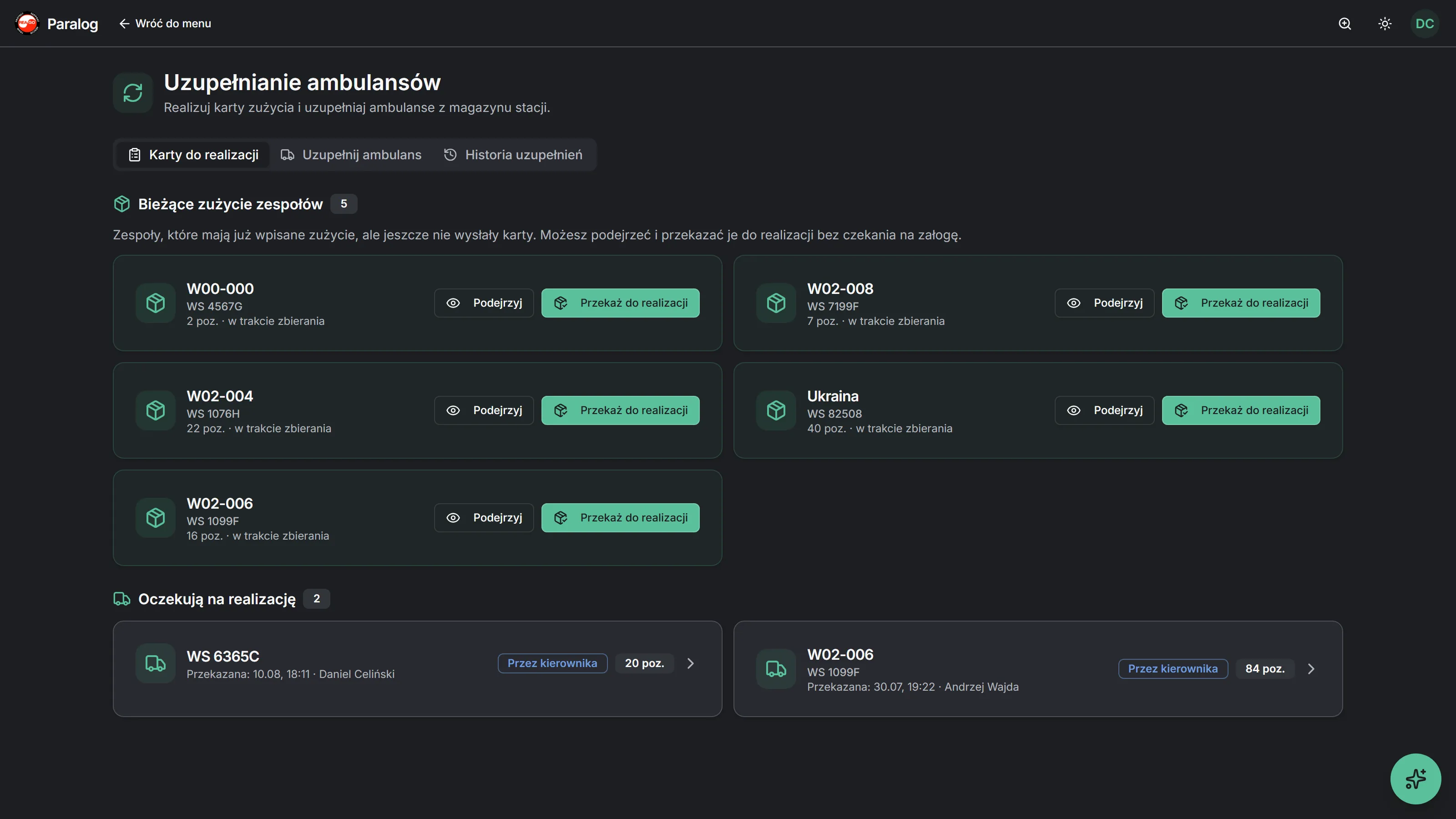
Consumption cards arrive from ambulances automatically; issuing from the warehouse takes a few clicks, and shortages carry over to the next card. Minimum levels suggest requisitions, expiry dates take care of themselves, and the Teams hub joins shifts, work cards and a roster with a crew generator.
03 · HQ
Approvals, suppliers, invoices and PZP settlements — without retyping.
An approved requisition splits itself into orders per supplier. An invoice from KSeF (XML) or a scan (OCR) is matched to the order line by line, the manager receives the delivery with a protocol, and HQ settles the invoice against PZP contracts with time-bound prices and allocates costs to teams. Statistics and XLSX/PDF exports ready for tenders and audits.
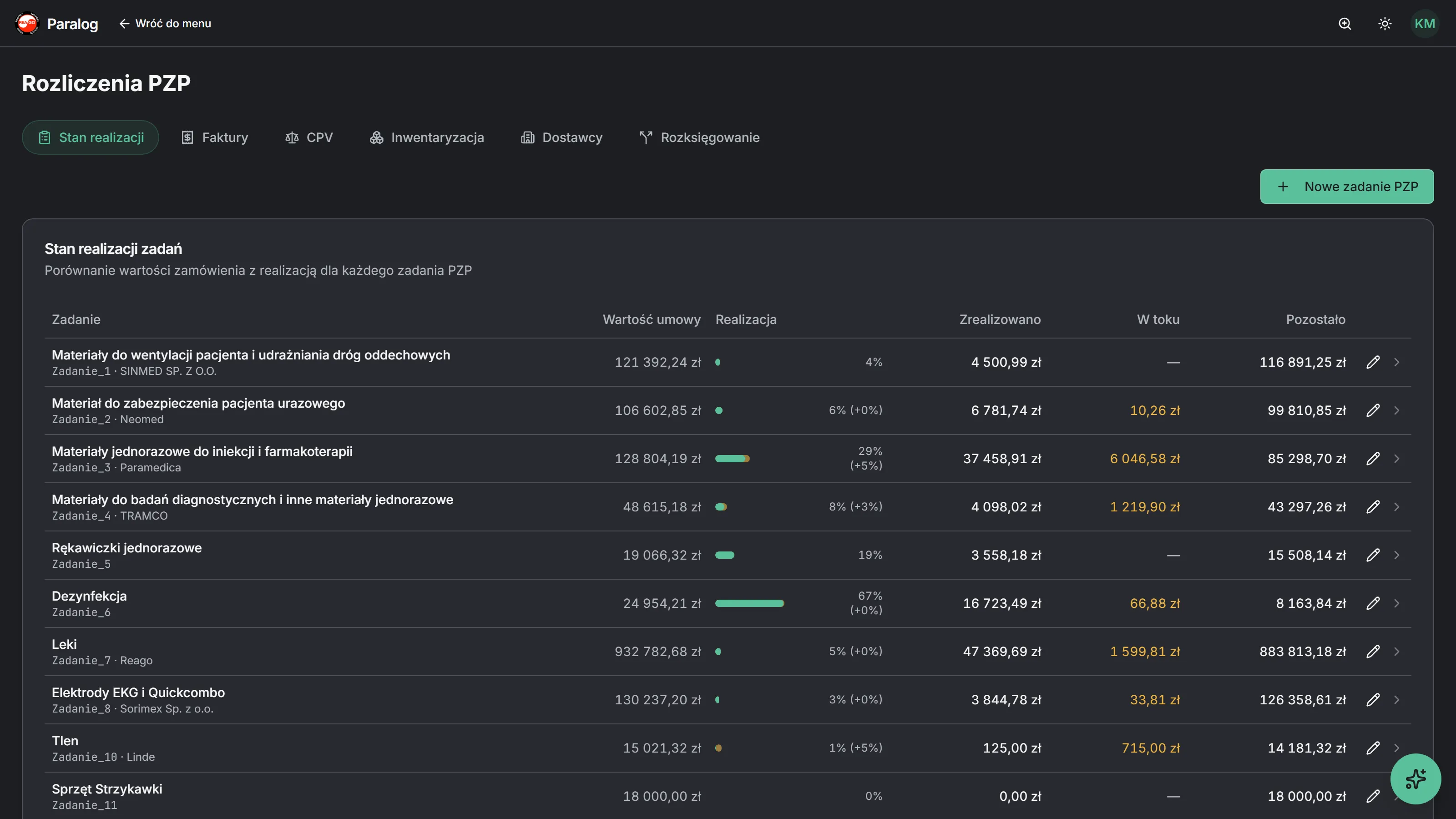
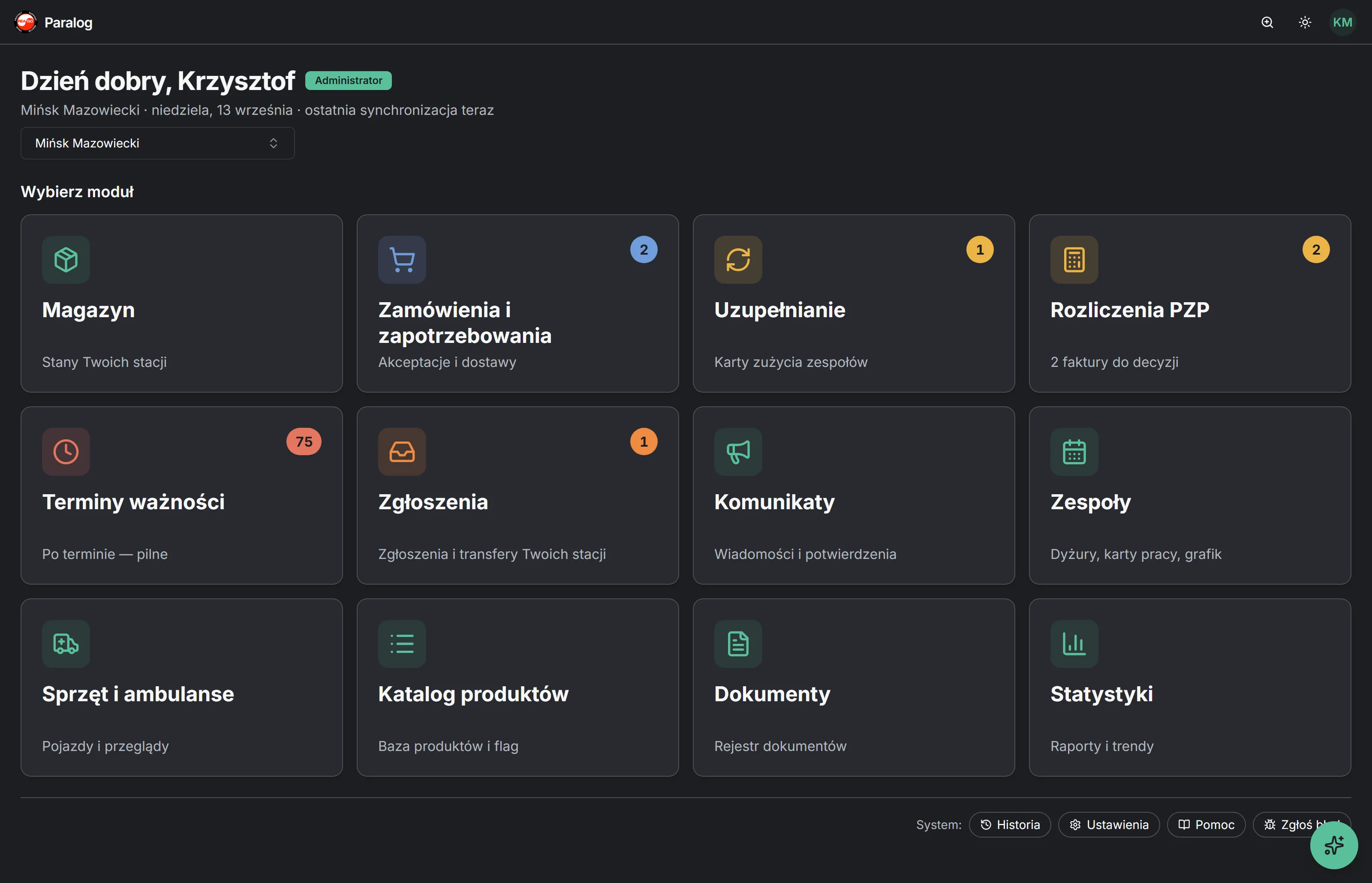
Twelve modules. One start screen.
Paralog grew out of the real processes of an ambulance station — every tile replaces a specific spreadsheet, tool or paper flow. You only see what you have permission for.
Warehouse
Stock per product, movements with full history, receipts, issues, corrections with justification and transfers between stations.
Orders and requisitions
Wizard with shortage hints, HQ approval, auto-split by supplier, deliveries with a receipt protocol and invoice import.
Replenishment
Team consumption cards to fulfil, warehouse issue, receipt confirmation and automatic carry-over of shortages.
PZP settlements
Contracts and PZP tasks, time-bound prices, CPV codes, invoice validation, corrections and cost allocation to teams.
Expiry dates
Registry of dates in the warehouse and in every ambulance, periodic checks, PDF disposal protocol.
Reports
Equipment and ambulance failures with photos, receipt discrepancies, transfer requests — from report to closure.
Announcements
Messages to everyone, a station or selected people. An evidential announcement requires PIN acknowledgement — H&S, exams, annexes.
Teams
Shifts with checklists, work cards with hour confirmation, roster with availability and a crew generator.
Equipment and ambulances
Equipment base with serial numbers, vehicles, inspection and service schedule, history and costs, documents.
Product catalogue
One product base with categories, units, kind (consumable / reusable equipment) and quantity guards.
Documents
Registry of every document generated in the system: protocols, orders, invoices, PDFs and exports.
Statistics
Consumption per team, product and period, rankings, stock valuation, SIWZ calculator, XLSX and PDF exports.
Plus the system layer: activity history in plain language, settings with search, help and bug reporting from every screen.
See Paralog from the inside
Click through the key views — exactly as they look on the screen of a station manager and HQ. The tour plays on its own; click a screenshot to enlarge.
01 / 12
Everything that matters, one click away
- Module tiles with counters: what awaits a decision, what is overdue, how many cards to fulfil
- The station picked here carries over to every other screen — HQ switches context in a second
- Only the modules the account has permission for are shown
From the ampoule at the patient to a settled invoice. No retyping.
This is one path that today is travelled by a sheet of paper, three spreadsheets and two people retyping numbers. In Paralog data is entered once — where it originates.
- 01
Consumption at the patient
Medical staff add an item to the consumption card from the smartphone — by hand or by voice — and confirm with a PIN. Quantity guards catch a typo before it reaches the database.
- 02
The card reaches the manager
The sent card appears in Replenishment. The manager issues from the warehouse, the team confirms receipt, shortages carry over to the next card.
- 03
Minimum level suggests a requisition
The wizard shows what is missing against norms. The requisition goes to HQ with one click.
- 04
Approval and auto-split
HQ approves and the system splits the requisition into orders per supplier and PZP task. PDF and e-mail to the supplier from the system.
- 05
Invoice meets order and delivery
KSeF XML or an OCR scan is matched to order lines. The manager receives the delivery with a protocol, expiry dates land in the registry.
- 06
PZP settlement and statistics
The invoice is validated against the contract price, costs allocated to teams. Everything visible in statistics and exports — ready for the tender and the audit.
5
database instead of five Excel workbooks
3
retypings of the same number
0%
of operations with a full trail
A smartphone in the ambulance. Works without signal too.
Medical staff work under stress, sometimes next to the patient. That is why the ambulance app is four big actions on the home screen, a PIN instead of a password and an offline-first architecture.
Four actions from the home screen
Report consumption
What was used at the patient — by hand or by voice, straight onto the consumption card.
Report equipment failure
With photos, in seconds — straight into the manager's inbox.
Report ambulance failure
Emergency vehicle swap from the terminal when you have to keep going.
Shift checklist
Two parts: medical and driver. A checklist problem becomes a report by itself.
Clock-in and crew on shift
Staff join the ambulance crew with a PIN at the start of the shift — with a hint from the roster. It is always known who was on which shift, what they used, what they reported and which dates they checked.
Offline-first, for real
Install without an app store
A PWA — installed straight from the browser on the smartphone assigned to the ambulance. A new version is one "Refresh" toast.
Cache for the whole shift
Product catalogue, consumption cards and checklists stored locally for 36 hours — longer than a shift.
Work without network
Reports are saved locally in places without signal — in the field, in the garage, in the hospital basement.
Automatic sync
Once the connection is back, data syncs on its own, keeping the time of the event.
PIN instead of password
Every action confirmed with a short PIN and a one-time token — the system knows who reported, without logging in on the shared phone.
One system, four account types
Access comes from a permission profile and station scope, not from a role hard-coded in the software. Everyone sees exactly what they need for their work — nothing more.
HQ / management
Full picture of every station: requisition approval, PZP contracts, invoices, allocations, strategic statistics, announcements and permission configuration.
Station manager
The warehouse of their station or several stations: card fulfilment, minimum levels, requisitions, reports, shifts, work cards and team roster.
Medical staff (web)
A personal self-service account: availability, my roster, my hours, leave requests, announcements — from the browser or the phone.
Ambulance account
The shared smartphone in the vehicle: checklist, consumption, failures, expiry, announcements — every action confirmed with the employee's personal PIN.
From analysis to pilot — without stopping the station
The system was not designed in isolation: it grew out of months of conversations with medical staff and managers of a working ambulance station. The rollout runs alongside daily work.
- 1
Stage 1
Process analysis
We get to know your organisation: stations, teams, document flow, existing spreadsheets and PZP contracts.
- 2
Stage 2
Data migration
We move data from spreadsheets: product catalogue, stock, equipment, contracts, price lists and expiry dates.
- 3
Stage 3
Configuration and training
We set up stations, permission profiles, checklist and roster templates. Managers and teams are trained separately, for their own work.
- 4
Stage 4
Pilot
Go-live at a chosen station or the whole organisation, with ongoing support and quick reaction to feedback — changes reach the product in days, not quarters.
- 5
Beyond
Development and support
The system grows with you — new features come from real user needs, and every change passes automated tests.
A quote tailored to your organisation
There is no single price list for everyone. We prepare each quote individually — depending on whether we roll out one station, a network of stations with an HQ, or a whole organisation with its own requirements.
One station
A single ambulance station or a medical transport base.
The full system for one station: warehouse, consumption cards, orders, expiry dates, equipment, teams and ambulance accounts with the offline app.
Custom quote
Ask for a quoteStation network
Several stations and an HQ approving orders.
Everything for one station, plus transfers between stations, PZP settlements and invoices at HQ, and statistics for the whole network.
Custom quote
Ask for a quoteWhole organisation
A large entity with non-standard needs.
Dedicated features and integrations, an SLA agreement, a test environment and system development around your processes.
Custom quote
Ask for a quoteStandards management understands — and so does IT
Permissions (RBAC) and station scope
Configurable permission matrix per module and action, system and custom profiles, "view only" accounts for inspectors. Enforced in the API, not just the interface.
Immutable event log
Every operation recorded: who, what, when, why. A correction is a new entry, never an overwrite. History available inside the system.
Secure cloud
Encrypted connections, HTTP-only sessions, login attempt limits, database backups with point-in-time recovery.
Exports and documents
PDF protocols, XLSX exports for accounting, equipment documents and invoices in one registry — generated from data, never the other way round.
AI-ready
The AI assistant, invoice OCR and voice entry already work today. One database opens the way to consumption forecasts and order optimisation.
See Paralog in action
Book a free demo — we will show the system on real scenarios: from a consumption report in the ambulance to invoice allocation to teams.
soczynskiwojtek@gmail.com